
I Built VPS Graph: A Read-Only Infrastructure Explorer for JetBrains IDEs
I built VPS Graph after repeatedly SSHing into my server just to remember how Docker, Caddy, systemd, ports, and other infrastructure pieces connected. It is a free, open-source, local-first and read-only infrastructure explorer for JetBrains IDEs.
The Problem#
I have a Linux VPS that runs several of my projects.
Over time, Docker containers, Compose applications, Caddy routes, systemd services, published ports, networks, mounts, and other infrastructure pieces started accumulating on it.
Everything worked.
The problem usually appeared a few weeks or months later, when I needed to remember how those pieces actually connected.
Which container is behind this domain?
Where does Caddy send this request?
Is that port exposed by Docker, or is a host service listening on it?
Which Compose project owns this container?
I could always SSH into the server and figure it out.
And I did.
Again and again.
Eventually, I realized that the real problem was not accessing the information.
The problem was rebuilding the same mental model of the server every time.
That is why I built VPS Graph.
What Is VPS Graph?#
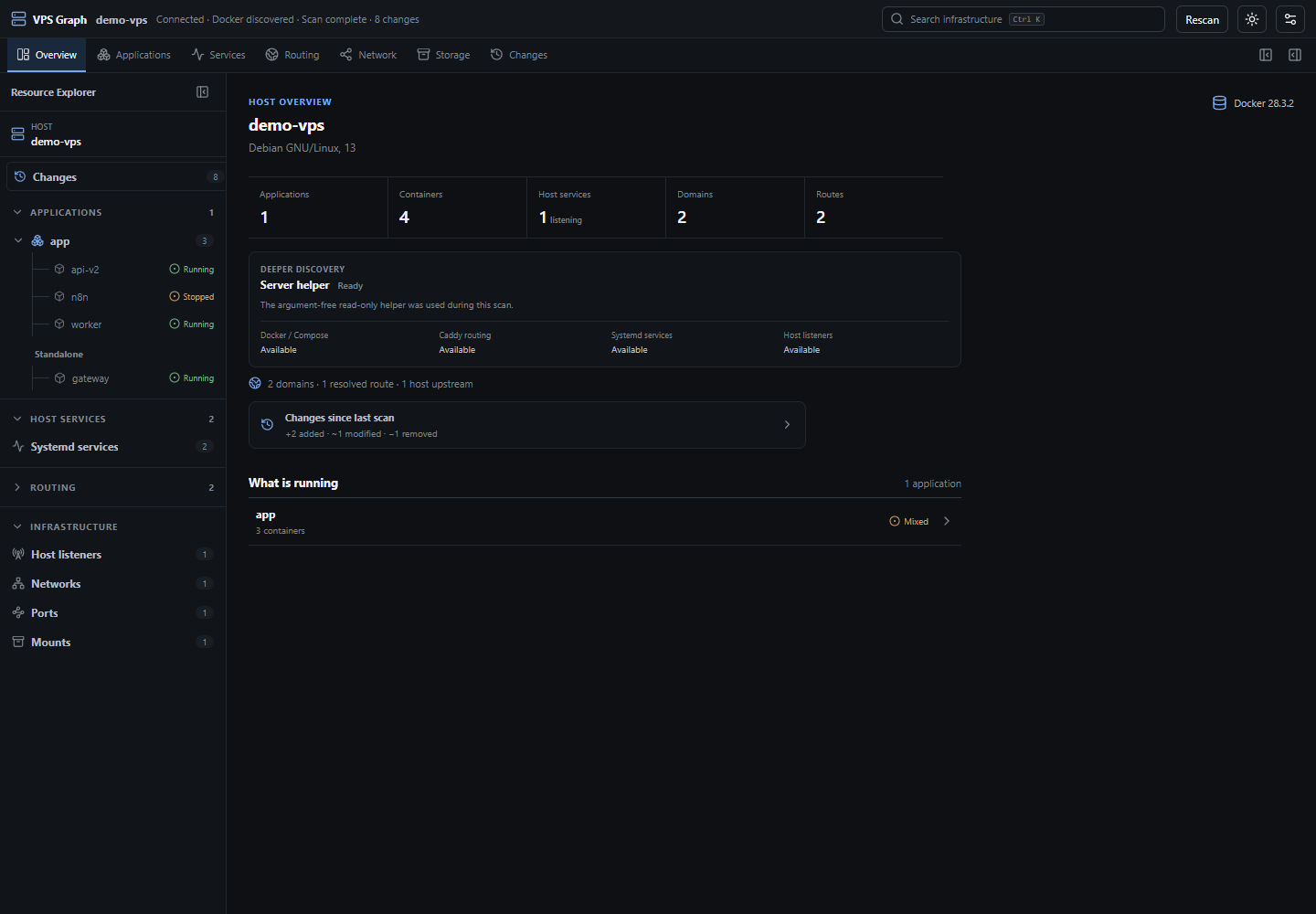
VPS Graph is a local-first, read-only infrastructure explorer for Linux VPSs.
It runs inside JetBrains IDEs and connects to a server using public-key SSH.
Instead of trying to replace your terminal or become another server management panel, VPS Graph focuses on one thing:
helping you understand what is running on your VPS and how everything connects.
It can currently discover and represent information about:
- Docker and Docker Compose
- containers
- Docker networks
- published ports
- mounts
- Caddy routes
- domains and upstreams
- systemd services
- host listeners
- relationships between these resources
The result is not just another long list of services.
Topology is one of the primary ways VPS Graph represents infrastructure.
For example, a route can become something like:
monitor.example.com → Caddy → host port 19999 → netdata.service
That is much closer to the way I actually think about infrastructure.
Read-Only by Design#
One decision was important from the beginning:
VPS Graph should not modify the server.
There are already plenty of tools that deploy applications, restart containers, edit configuration files, or provide remote administration.
That is not what I wanted to build.
VPS Graph is intentionally designed for discovery and understanding.
It does not:
- deploy applications
- restart services
- start or stop containers
- modify configuration files
- execute arbitrary remote management commands
I wanted to be able to point the tool at a server without giving another application broad control over that machine.
Local-First, Without Another Cloud Account#
There is no VPS Graph account.
There is no VPS Graph cloud backend.
There is no cloud database containing your infrastructure.
There is no telemetry.
Scans are started manually, and infrastructure snapshots are stored locally.
Connection information that can be remembered is deliberately limited to fields such as:
- host
- SSH port
- username
- private key file path
VPS Graph does not store private key contents, passwords, or passphrases.
SSH host verification also uses your local known_hosts file instead of silently trusting unknown servers.
Optional Server Helper#
Some infrastructure information cannot be discovered safely as an unprivileged user.
For deeper discovery, VPS Graph provides an optional server helper.
I specifically did not want the solution to be:
Give the plugin unrestricted sudo access.
The helper instead follows a narrow permission model.
It is not a daemon.
It does not expose a network service.
It is only invoked during Scan or Rescan and returns a limited set of allowlisted infrastructure metadata.
Basic discovery can still work without it.
The helper enables deeper visibility into areas such as Docker, Caddy, systemd services, and host listeners.
For better privilege isolation, using a dedicated unprivileged SSH account for VPS Graph is recommended, although an existing SSH account is also supported.
The helper does not add that user to the docker group or grant unrestricted sudo access. It only allows the selected SSH user to execute the exact, argument-free VPS Graph inspection helper command.
Local Snapshots and Change History#
Seeing the current state of a server is useful.
Knowing what changed is often even more useful.
VPS Graph stores infrastructure snapshots locally and can compare them between scans.
The Changes view can identify:
- added resources
- modified resources
- removed resources
- added relationships
- removed relationships
- uncertain changes when discovery was incomplete
For example, if a container moves between Docker networks, VPS Graph can show both the container metadata change and the topology relationship that changed.
All of that history remains local.
Building VPS Graph Inside JetBrains#
VPS Graph is distributed as a JetBrains plugin.
The scanner core is written in Kotlin and kept separate from the IDE integration.
The interface is built with React, TypeScript, and React Flow, then rendered inside JetBrains IDEs through JCEF.
At a high level, the architecture looks like this:
SSH → scanner-core → infrastructure graph → JetBrains bridge → React UI
Keeping the scanner independent from the JetBrains IDE integration was intentional.
If the project grows enough and there is demand for it, this architecture also leaves the door open for a standalone VPS Graph desktop application in the future.
For now, the JetBrains plugin is the product.
Testing Against a Real VPS#
A large part of development involved testing VPS Graph against a real Debian VPS instead of relying only on fixtures and automated tests.
That turned out to be important.
Real usage exposed issues that synthetic tests had not.
One involved native text dragging inside JCEF causing the interface to become unresponsive.
Another appeared in the Changes system because a schema field was missing from the Kotlin-to-frontend response even though the underlying snapshots and diff were valid.
Both problems were caught and fixed before the public release.
The Changes system was tested against real infrastructure scenarios including:
- resource additions
- resource removals
- modifications
- relationship additions
- relationship removals
- historical comparisons
That process reinforced something I already believed:
infrastructure tooling needs to be tested against real infrastructure.
What VPS Graph 0.1.1 Supports#
VPS Graph 0.1.1 is distributed as a single plugin for compatible JetBrains IDEs.
So far, I have manually tested it on:
- IntelliJ IDEA
- PyCharm
- WebStorm
- GoLand
- Rider
The current release focuses on:
- one active Linux VPS at a time
- Debian and Ubuntu focused discovery
- manual scans
- public-key SSH authentication
JetBrains Marketplace may show compatibility with additional JetBrains products. However, Marketplace compatibility does not necessarily mean that I have manually tested VPS Graph on that IDE.
Some SSH configurations are not supported yet, including password authentication, SSH agent authentication, ProxyJump, and bastion hosts.
Those limitations are deliberate.
For the 0.1.x line, I preferred a smaller security model with clear boundaries instead of trying to support every possible SSH configuration immediately.
Free and Open Source#
VPS Graph is completely free and open source under the Apache License 2.0.
There is no paid tier.
There is no account requirement.
For this early public beta, what I care about most is finding out whether other developers have the same problem I had.
If you use a JetBrains IDE, manage your own Linux VPS, and occasionally find yourself opening SSH just to answer:
"What was connected to what on this server again?"
I would love for you to try VPS Graph.
Try VPS Graph#
JetBrains Marketplace
VPS Graph on JetBrains Marketplace
GitHub
The project is open source, and bug reports, feedback, and ideas are all welcome.
VPS Graph is still in the 0.1.x stage, and real user feedback will help shape where the project goes next.

About The Author
Cemil İlkim Teke
Full-stack developer building practical web, mobile, backend, and AI-enabled products.